Write your first test
Open Calibro Test from Apps, pick a project, and you're on the Library tab. A project with nothing in it yet offers Write the first test; one with tests has New test above the list. Either way the editor is the same, and it is the same editor you reach from a story's Tests panel — with the story pre-filled.
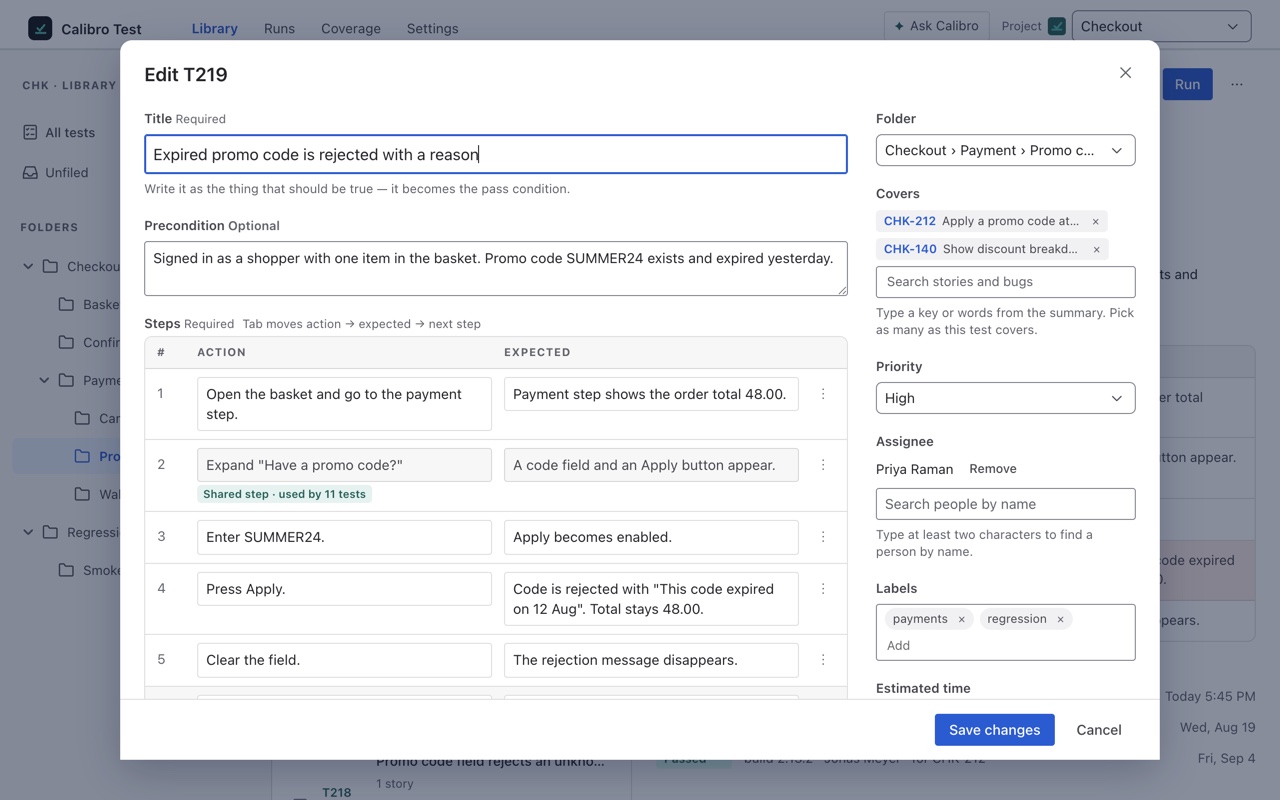
The title is the pass condition
Write the title as the thing that should be true — Promo code is case-insensitive, not Test promo codes. It becomes what a passing run asserts, and it is what the Tests panel shows beside a result, so a title that names the behaviour reads as a verdict on its own. The Precondition is the state the tester needs before step one, in a sentence or two: Signed in as a shopper with one item in the basket.
Steps
A step is an action and what should be true afterwards. Tab moves from the action to the expected result to the next step, so a test can be typed without touching the mouse. A setup step can leave its expected result blank. A test needs at least one step and can hold up to a hundred.
- Type what you do in the action column — Enter the code in lower case and apply it.
- Type what should be true in the expected column — The discount is applied and the code is shown in upper case.
- Press Tab for the next step, or Add step.
Have the steps somewhere already? Paste a list into the action column and each line becomes a step; a line written as action -> expected result fills both columns. Each step's menu can move it, remove it, or make it shared — a shared step is kept once for the project and inserted into other tests with Insert shared step, which is how a login sequence stops being retyped in forty places. The library has more on shared steps.
What it covers
Covers is the list of stories and bugs this test is evidence for. Search by key or by words from the summary, and pick as many as the test covers. Each of them gets this test in its Tests panel, and each one's Test coverage field follows this test's results from the first run. Opening the editor from a story's panel pre-fills it.
The rest is optional: a folder to file it in (unfiled is fine), priority (medium unless you say otherwise), an owner, up to twenty labels, and an estimate of how long one run takes, in minutes.
Create, or create and run
Create test saves it and gives it a key — T219 — which is how it is named everywhere from then on. Create and run saves it and opens a run of it straight away, for the case where you are writing down what you are about to do anyway.
Tests are stored by Calibro Test on this Jira site, not as issues. T219 won't appear in Jira search — the stories it covers will, through their Test coverage field. That is deliberate: no issue type to add, no scheme to configure, and nothing of ours in your backlog.