Tests drafted from a story
Any story can have tests drafted for it from the description and the acceptance criteria. Press Suggest tests in its Tests panel and the drafts appear a few seconds later. Nothing is drafted until somebody asks — opening a story only shows the tests that already exist.
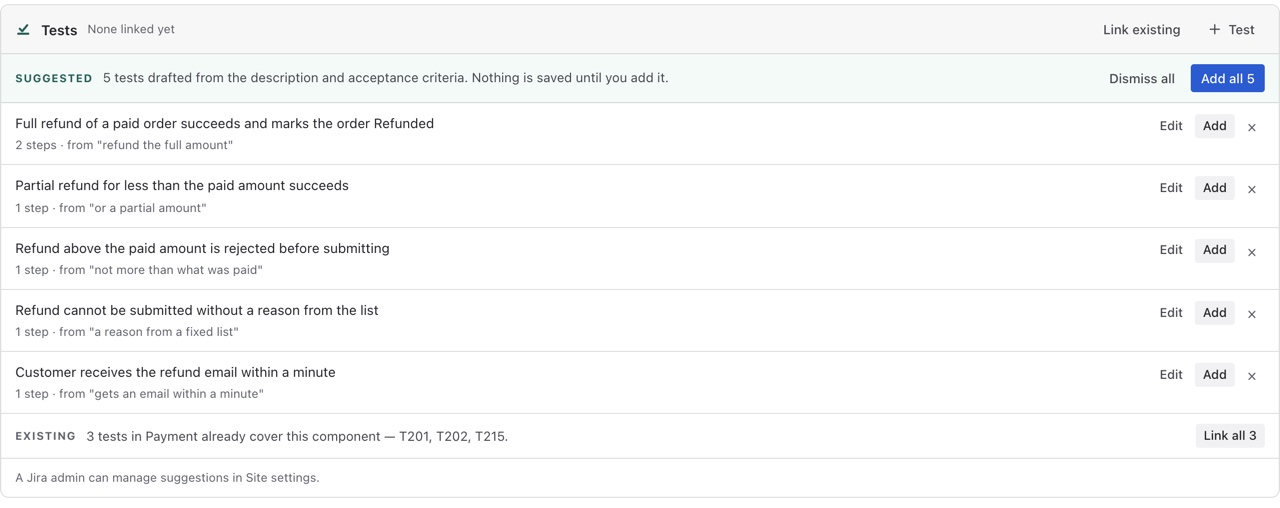
What a draft is
A title written as a pass condition, a handful of steps with expected results, and the sentence in the story that prompted it — 4 steps · from “Discount codes are not case-sensitive”. It is a draft in the plain sense: not in the library, not covering anything, not counted anywhere. The story's Test coverage field stays Not covered until one is added.
Adding, editing and dismissing
Read the expected results before adding. The model has the story's text and nothing else — it does not know your product, and a confidently wrong expected result becomes a test that fails for the wrong reason. Edit before adding is there for exactly that.
When there's nothing to draft
A story with a one-line description gets the message The model found nothing in this story it could turn into a test. Write the first one by hand, or refresh once the description has more in it.
Where the model runs, and turning it off
Drafts are written by Atlassian-hosted Claude through Forge, inside the same boundary as everything else the app does. The story text stays inside Atlassian; nothing goes to a third party, and the app declares no external egress. A site admin can turn suggestions off for the whole site in Settings › Suggestions, and every panel then simply shows the tests that exist.