The Tests panel
Every issue on your site carries a Tests panel. It is the surface most people see, and it is meant for everyone: a developer or a product owner sees which tests cover the story, how they did, what failed and where the bug is, without opening the library.
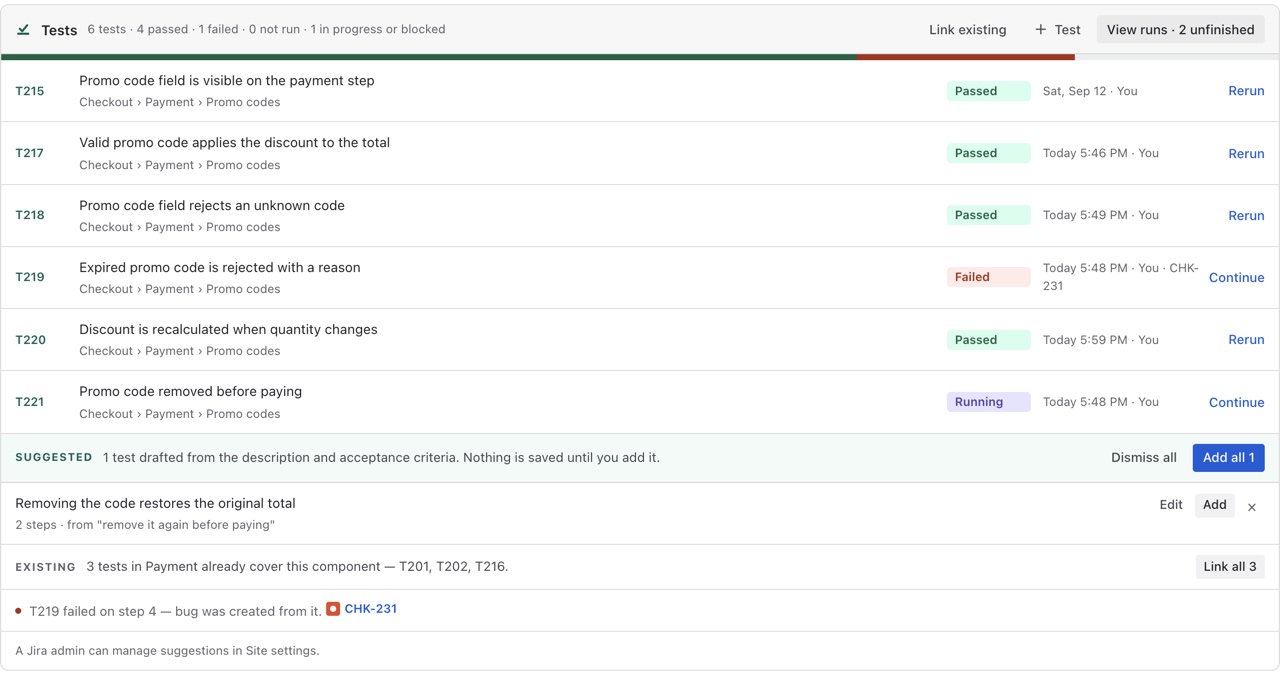
What it shows
One line at the top — 3 tests · 2 passed · 1 failed — and a bar of the same in colour. Under it, each linked test with its key, its title and its latest result, or Never run. A test that failed carries a note saying which step it failed on and, once one exists, the bug that was created from it: T219 failed on step 4 — bug CHK-231 was created from it. Both are links.
The story's Test coverage field is the same facts reduced to one word, so the panel and the field never disagree.
What you can do from it
Tests that already cover the component
A folder in the library can be linked to a Jira component. When a story carries that component, the panel shows an Existing strip — 4 in Checkout already cover this component — T201, T202, T203, T204 — with Link all beside it, so the regression set for an area is one click away on every story in that area. The library says how to link a folder.
Shows the same three ways in — write one, link some, or press Suggest tests to have some drafted from the description. Suggestions describes those.
For everyone, not only QA
Reading the panel needs nothing but the ability to see the issue. Writing, linking and running need the app's licence to be active, and recording a step needs the run screen, which the panel opens. Nothing here changes the issue itself: the panel reads the story and writes only its coverage field.