Running a test
A run is one test, step by step, with a verdict on each. Start one with Run on a test in the library or in a story's Tests panel, with Run all on a folder or a story, or with Create and run from the editor. The run screen shows the precondition, then the steps one at a time.
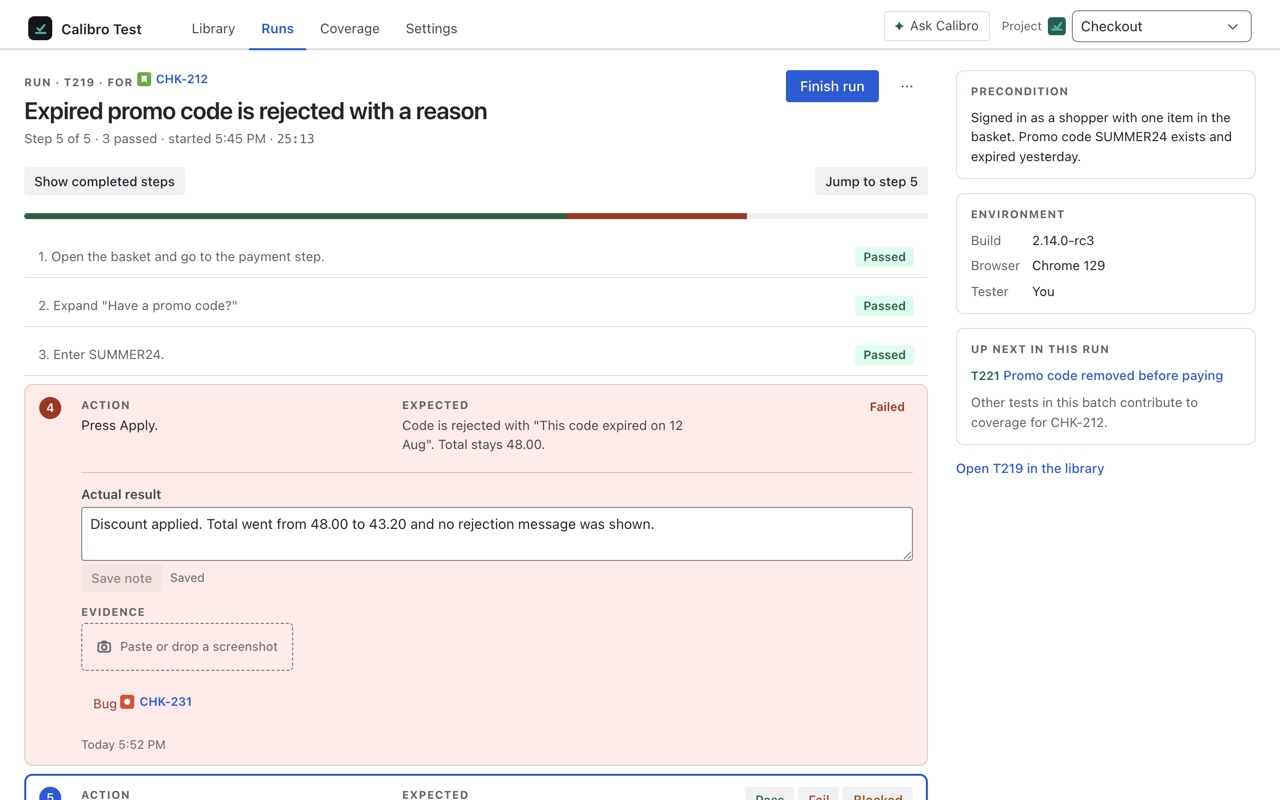
Recording each step
Each step shows its action and its expected result, and three buttons: Pass, Fail and Blocked. P, F and B do the same from the keyboard, so a run is walked without reaching for the mouse. A failed step asks for the actual result — what happened instead — and that text goes into the bug. The line at the top keeps score: Step 4 of 7 · 3 passed · started 10:12 · 4m. Build, browser and environment can be noted on the run for the report.
A failing step is a verdict
The moment a step is marked failed, the run is failed and the story's Test coverage field says Failing — not when you press Finish. Keep going and record the rest of the steps; a later pass never undoes the failure, because the fact a filter on Failing wants is that this test found something.
Evidence
Paste a screenshot onto a step, drop an image file on it, or click to choose one. It is attached to the Jira story the run is for, as an ordinary attachment anyone can open from the issue, and the run keeps a thumbnail. Images only, up to 4 MB each. A run for a test that covers no story has nowhere to put evidence and says so — link the test to a story first.
The bug
Once a step has failed, Create bug files a Bug in the project pre-filled with the steps so far, the expected and actual result, and the evidence, and links it to the story and to this run. Or Link existing if the bug is already known — type its key. One bug per run; the Tests panel then names it beside the test. Nothing is filed unless you press the button.
Pausing and finishing
Pause run keeps everything recorded so far and lets you come back later; the Runs tab lists it under Paused with Continue. Finish run closes it. A run whose every step has a result closes itself. Finishing with steps still unrun asks first, because the result is Blocked, never Passed: a verdict the steps don't support is the one thing a report must not say. A finished run cannot be changed.
Whose run it is
A run belongs to the person who started it. Anyone can open it and read it; only the tester can record steps, and the screen says so to anyone else. The Runs tab lists every run in the project — test, story, tester, status, steps done and when it started — and Delete run is there for the tester, or a Jira admin: the verdict comes off the stories it was for, and the newest remaining run takes over.
Running several at once
Run all on a story, or on a folder in the library, starts every test as one batch walked in order. Each run shows what is up next, and when the last one finishes the story's field updates. Run remaining on a story does the same for only the tests with no result yet. There is no plan-cycle-execution hierarchy above this, and that is deliberate: a batch is the lightweight version, and it has been enough so far. Tell us on the roadmap if it isn't.